
Norli eBook1.2.0 - Get APK
You'll be able to download in few seconds.
Publisher Description
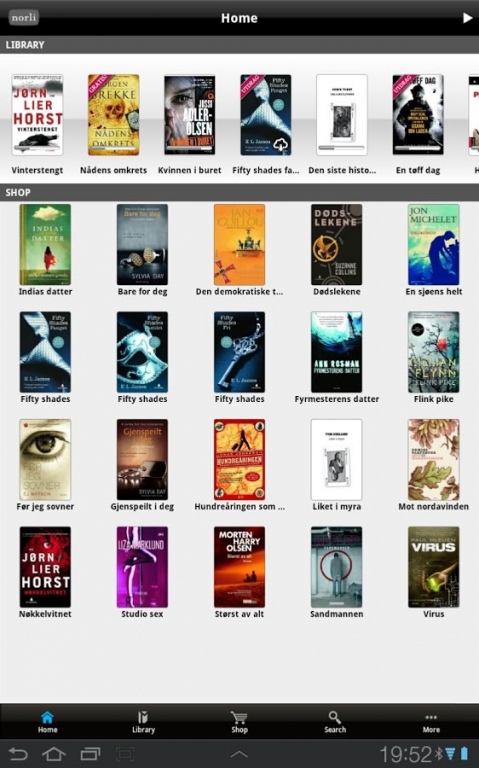
Read ebooks on your smartphone or tablet with Norli’s newest reading app. The app is easy to use and offers excellent reading comfort. Choose between a variety of functions and settings. The app is automatically synchronized to last read page in all your Norli applications (Android or iOS devices), including Norli’s eReader (e-ink) from Kibano. Enjoy news articles and book reviews (in Norwegian). The Norli e-books solution is connected to “Bokskya”.
Functions:
- Read EPUB (leading ebook file format) and PDF-files
- Norli eBook in-app shop with Danish, English, Norwegian and Swedish eBooks.
- Book reviews and news articles
- Create customer account, which will also be valid at www.norli.no and Kibano E-reader version Norli Libris
- Read free book-samples
- Import and read your personal PDF-documents
- Slide-function gives you quick and easy movement back and forth
- Synchronize bookmarks between Norli app and Norli’s Kibano e-reader
- Add notes, bookmarks and highlights. Well suitable for students and work related books.
- Synchronize last read page andnotes between e-reader and all Norli apps (Android and iOS devices) .
- Automatic import of all e-book purchases in Bokskya-connected bookshops
- Multiple choices: Day/night reading view with comfortable sepia color, adjustable backlight, adjust margins and font size
- Choose Landscape or portrait view. Internal lock screen rotation-function available
- Supports Adobe DRM. Add multiple Adobe-IDs
About Norli eBook
The company that develops Norli eBook is powered by menca. The latest version released by its developer is 1.2.0.
To install Norli eBook on your Android device, just click the green Continue To App button above to start the installation process. The app is listed on our website since 2014-06-30 and was downloaded 0 times. We have already checked if the download link is safe, however for your own protection we recommend that you scan the downloaded app with your antivirus. Your antivirus may detect the Norli eBook as malware as malware if the download link to com.menca.droid is broken.
How to install Norli eBook on your Android device:
- Click on the Continue To App button on our website. This will redirect you to Google Play.
- Once the Norli eBook is shown in the Google Play listing of your Android device, you can start its download and installation. Tap on the Install button located below the search bar and to the right of the app icon.
- A pop-up window with the permissions required by Norli eBook will be shown. Click on Accept to continue the process.
- Norli eBook will be downloaded onto your device, displaying a progress. Once the download completes, the installation will start and you'll get a notification after the installation is finished.
Program Details
System requirements
Download information
Pricing
Version History
version 1.2.0
posted on 2014-06-30
-Minor bug fix
Disclaimer
External Download
We do not host Norli eBook on our servers. We did not scan it for viruses, adware, spyware or other type of malware. This app is hosted by Galad and passed their terms and conditions to be listed there. We recommend caution when installing it.
The APK Download link for Norli eBook is provided to you by apps112.com without any warranties, representations or guarantees of any kind, so access it at your own risk.
If you have questions regarding this particular app contact the publisher directly. For questions about the functionalities of apps112.com contact us.
